

Please use the following search box to quickly locate valuable FAQ support guide.
You can use key words or full statement to search by. Alternatively you can simply browse by Category belowUpdates to NVIDIA Driver environments released during 2025 causes some customers to have problems with some 3D application functions.
CleverOne: The following symptoms may be present due to GPU setting or driver settings.
Ez3D-i: The following symptoms may be present due to GPU setting or driver settings.
Conditions of Occurrence:
Graphic model:
- Quadro series RTX graphics cards (A series, T series)
For reference, there is no issue with Geforce series graphics cards.
Graphics driver:
- The issue occurs in driver environments released 2025 with certain Nvidia Graphic Card driver / Control panel settings by default from NVIDIA.
- When NVIDIA Graphic Card driver is updated - the Global Preset automatically resets to 'Base Profile' which acts like a low power mode.
- Ensure the NVIDIA Control panel has been installed, if it has not please Download: Install the NVIDIA Control Panel First, then adjust the Global preset.
- It is Highly recommended to have Clinical IT consultant turn off updated to the GPU from Windows Update other wise anytime this update hits it will revert back to the 'Base Profile'
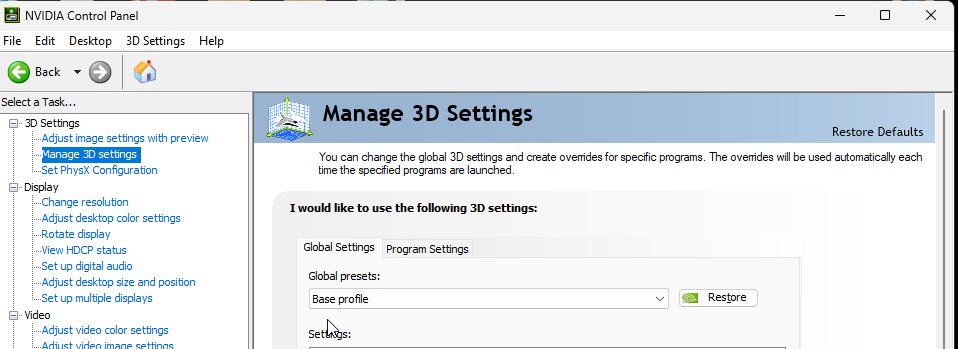
Solution:
When the NVIDIA driver is updated the Global Settings must be changed to "3D App- Game Development"
This setting will have to be selected on any update to the driver from NIVIDA.
Run NVIDIA Control Panel → Manage 3D Settings → Global Settings → Set Global Preset to “3D App - Game Development” and click the Apply button.
Note: The “Global Preset” feature is not provided in NVIDIA GTX/RTX environments, only in lineups such as Quadro.
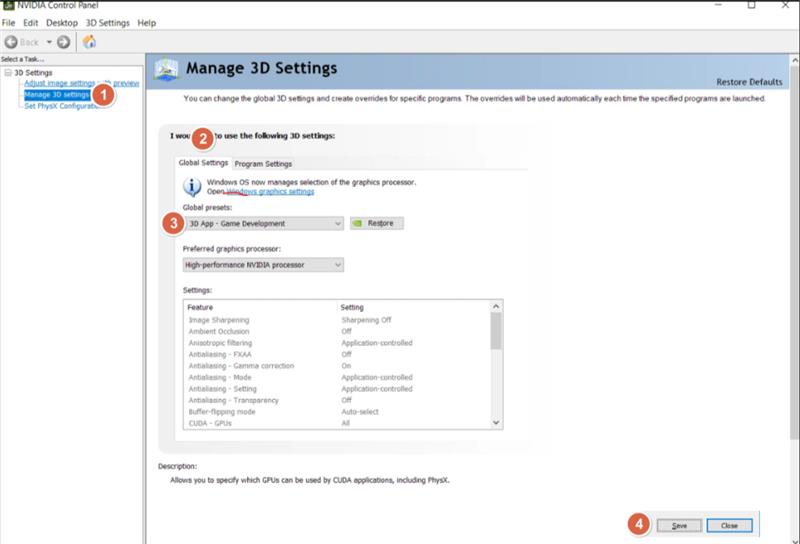
For Dell ProMax PC:
RTX 5070 GPU or higher is required.