

Please use the following search box to quickly locate valuable FAQ support guide.
You can use key words or full statement to search by. Alternatively you can simply browse by Category belowEzSeries: EzServer- Postgres and EzWebServer Compatibility guide
Although the Capture PC is delivered by manufacture with a local installation of EzServer, it is highly advised that the clinical I.T. Department/Persons evaluate each clinical usage need during yearly Data review and backup retention policy reviews to evaluate each clinic/office's data growth. The data base can be stored either locally or install on the Server at the time of installation.
- If using the Capture PC to store the data it will be all the more important to monitor and ensure adequate storage exists as the data base grows beyond the base Hard Drive space provided. Please see the Recommended Capture PC FAQ for more information on the Capture PC provided* under the Pre-installation sheets for the individual device type PC provided.
- IT can increase hard drive space or add additional hard drive space and move the data as needed locally by using the following EzServer Data Storage data path FAQ guide to move the data to a larger drive.
- IT can also Move the data from the Capture PC to the Server by following the EzSeries Migration guide.
Server Specifications:
Recommended Server PC specifications: All specifications are 'Minimum' to meet or exceed.
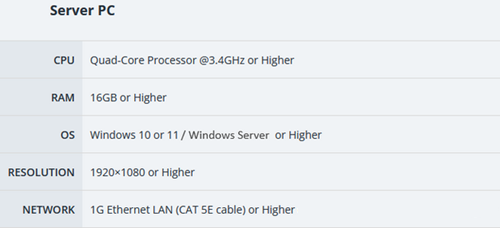
Supported OS & Server Compatibility:
Notice: It is important to note that EzServer uses PostGres SQL database and SHOULD NOT be installed on a PC/Server using another instance or version of PostGres as outlined in the EzServer manuals.
It is highly recommended to update to EzSeries - EzServer v.6.2.3 or newer for compliance. See EzServer 6.0 Update Guide
Server OS:
Virtual Server:HyperVisor
Windows OS:
Non- Supported OS & Server Compatibility:
The following systems are not supported by Vatech as they are considered non-supported or End-Life, in which we can not offer any support in setting up or configuration and should be considered 'Use at Own Risk'. Recommend updating to current mainstream supported Server/OS or alternative options when applicable.
Mac OS
Terminal Services
Windows OS/Server OS:
Virtual Server: HyperVisor
Virtual Machines
VPN:
All- None supported setup's should be considered 'Use at Own Risk'. Vatech is only able to offer limited Break-fix or Normal Installation support.
In the event the product does not function as intended it is recommended to host the EzServer on another system which is supported and make proper backups to the desired location.